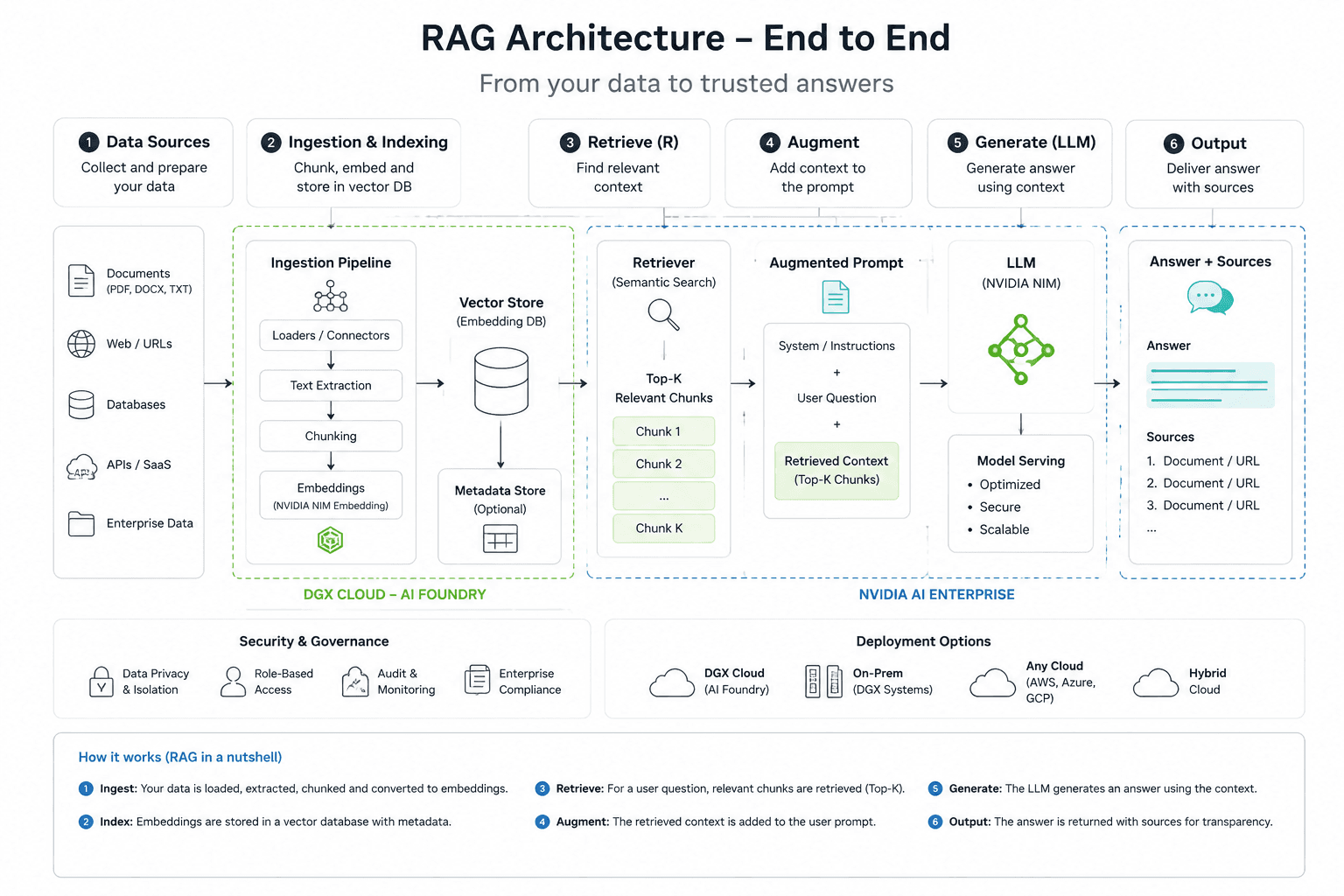
LLM, embedding, inference engine, vector database, GPU infrastructure, GenAI platform — each component has a distinct role. This guide clarifies who does what in a real RAG pipeline.
Originally published in French on blog.saifallah.dev
Why Think in Layers
Confusion in GenAI projects rarely comes from a lack of technology. It comes from a poor understanding of responsibilities. Two mistakes keep coming up: believing an LLM API solves everything, or over-engineering a stack before validating a single use case.
A solid RAG architecture reads as a chain of responsibilities. Each layer has a precise role, different vendors, and tradeoffs that belong to it alone. Conflating them leads to bad purchasing, deployment, and governance decisions.
Business sources → ingestion → chunking → embeddings → vector DB
                → retrieval → augmented prompt → LLM → sourced response
The Six Layers of a RAG Pipeline
Each layer answers a specific question. Mixing them up is how teams end up choosing a cloud provider because of a convenient LLM — and forget to think about the vector database, inference engine, or chunking strategy.
| Layer | Role | Representative examples |
|---|---|---|
| LLM | Generates text, reasons, synthesizes. The brain of the system. | GPT-4o, Claude 3.5 Sonnet, Llama 3.1, Mistral Large, Gemini 1.5 Pro, Nemotron |
| Embedding model | Transforms text into comparable numerical vectors. Essential for semantic search. | OpenAI text-embedding-3, Cohere Embed v3, Mistral Embed, NVIDIA NV-Embed, BGE |
| Inference engine | Exposes the model via API, optimizes throughput and latency in production. | NVIDIA NIM, vLLM, Hugging Face TGI, Ollama (local), llama.cpp (edge) |
| Vector database | Stores embeddings and handles semantic search queries at scale. | Pinecone, Milvus, Weaviate, pgvector, OpenSearch, Qdrant |
| GPU infrastructure | Provides compute capacity for inference and training. | AWS EC2 (A100/H100), Azure GPU VMs, GCP Vertex AI, OCI, DGX Cloud |
| GenAI platform | Orchestrates the layers: model management, evaluation, guardrails, agents, managed RAG. | Amazon Bedrock, Azure AI Foundry, Vertex AI, Databricks Mosaic AI |
The most important dividing line: the LLM is not the platform. The vector database is not the inference engine. GPU infrastructure is not a RAG strategy. Each layer is chosen, deployed, and operated independently.
The RAG Pipeline in Detail
RAG — Retrieval-Augmented Generation — connects an LLM to external data at query time. The value: answer questions grounded in internal documents, recent tickets, business databases, or any content that didn't exist when the model was trained.
Ingestion phase (batch or background)
Raw sources — PDFs, SQL databases, APIs, SaaS tools, websites — are extracted, split into chunks, transformed into vectors by an embedding model, then stored in the vector database. This cost is paid once, not on every query.
Runtime phase (on each query)
The user's question is also vectorized. The vector database returns the semantically closest passages. Those passages enrich the prompt sent to the LLM, which produces a sourced and verifiable response.
# Ingestion (one-time or incremental)
document → chunks → embed(chunk) → vector_db.upsert()

# Runtime — Naive RAG
query → embed(query) → vector_db.search(k=20) → top-k chunks → LLM → response

# Runtime — Advanced RAG
query → rewrite(query) → hybrid_search(vector + BM25) → rerank(top-k) → LLM → response
From Naive RAG to Advanced RAG
The linear pipeline above is a starting point, not a target. In production, three techniques meaningfully improve retrieval quality without changing the rest of the architecture.
Query rewriting. The raw query is often a poor search signal — too short, ambiguous, or loaded with conversational context. A lightweight LLM reformulates it before retrieval to improve recall. Variant: HyDE (Hypothetical Document Embedding), which generates a fictional document answering the question and uses it as the search vector.
Hybrid search. Vector search alone is strong on semantic similarity but weak on exact matches (proper nouns, identifiers, technical terms). Combining vector and BM25 (full-text search) via score fusion — RRF or manual weighting — improves recall across both query types.
Re-ranking. The vector database returns k candidates ranked by cosine similarity. A cross-encoder — slower but more accurate — re-scores them using the full content of both the query and the passage. Only the top 3–5 results make it into the final prompt. Cohere Rerank, BGE Reranker, and Jina Reranker are the most widely used options.
Incremental sync
For evolving corpora, re-indexing everything on each change is not viable. Production systems track new vs. modified documents via an updated_at field, a webhook, a SaaS connector, or a CDC pipeline (Debezium, Kafka). Only the delta gets re-indexed.
Inference Engines: Who Does What
The inference engine is the layer that exposes the LLM via an API and optimizes its execution. It handles request batching, quantization, GPU memory management, and latency. Often invisible at the application layer, but critical for performance and cost.
| Engine | Use case | Strengths | Limitations |
|---|---|---|---|
| NVIDIA NIM | Enterprise production, NVIDIA stack | Pre-configured TensorRT-LLM containers, GPU optimizations, enterprise support | Strongly tied to the NVIDIA ecosystem |
| vLLM | High-performance open-source production | PagedAttention for throughput, widely adopted, supports most open models | Enterprise support via integrators |
| Hugging Face TGI | Open-source production, HF-aligned | Native Hub integration, Inference Endpoints | Less turnkey than a full enterprise offering |
| Ollama | Local development and prototyping | One-command install, ideal for testing without infrastructure | Not designed for multi-user or production serving |
| llama.cpp | Edge, resource-constrained devices, quantized models | Efficient CPU inference, GGUF support, very lightweight | Less suited to large-scale centralized serving |
Simple selection rule: Ollama for local development, vLLM or TGI for open-source production, NIM if the stack is NVIDIA-optimized. For managed APIs — OpenAI, Anthropic, Mistral, Cohere — the inference engine is handled by the provider, so the question doesn't arise on the client side.
The NVIDIA Ecosystem in a RAG Pipeline
NVIDIA is more than a GPU vendor. Its ecosystem spans multiple layers simultaneously, which is a frequent source of confusion. The key point: these components are independent and can be used separately.
| Term | Role in a RAG pipeline |
|---|---|
| Nemotron | NVIDIA's LLM family, optimized for enterprise workloads and data synthesis. One model choice among many. |
| NIM | Containerized inference microservices. Production-ready packaging built on TensorRT-LLM, with GPU optimizations, batching, and monitoring included. |
| NeMo | Framework for training, fine-tuning, and adapting models on domain-specific data. Relevant when the project involves custom training. |
| AI Enterprise | Enterprise software suite: support, security, certified integrations — NIM + NeMo + Guardrails packaged for production. |
| DGX Cloud | Managed GPU platform for intensive AI workloads. Available through partner clouds (AWS, Azure, GCP, OCI) — not an alternative cloud. |
| NGC | Central registry and catalog: Docker containers, pre-trained models, SDKs, Helm charts. Distribution point for NIM and AI Enterprise. |
In a RAG pipeline, NVIDIA primarily contributes to two layers: GPU infrastructure (DGX Cloud or partner cloud instances) and the inference engine (NIM). NeMo matters if the project involves fine-tuning. Nemotron is a model choice — it doesn't lock you into the rest of the NVIDIA stack.
AWS, Azure, GCP: What You're Actually Choosing
The three major clouds each offer a complete GenAI stack, but with different positioning. The decision is not about "who has the best models" — they all offer the same ones through partnerships — but about the desired level of abstraction and compatibility with existing infrastructure.
| Need | AWS | Azure | GCP |
|---|---|---|---|
| Consume models via API | Amazon Bedrock | Azure AI Foundry / Azure OpenAI | Vertex AI Model Garden |
| Build an ML platform | Amazon SageMaker | Azure Machine Learning | Vertex AI Pipelines |
| Rent GPUs | EC2 P4/P5 (A100/H100) | Azure ND A100 / H100 | GCP A3 (H100) / TPU v5 |
| Deploy an open-source model | EC2 + vLLM/TGI | AKS + vLLM/TGI | GKE + vLLM/TGI |
| Managed RAG | Bedrock Knowledge Bases | Azure AI Search + Foundry | Vertex AI Search |
Managed API vs self-hosted: managed platforms reduce operational burden but create cloud lock-in. Self-hosted gives more control — over the model, costs, and latency — but requires a team that can operate it. The choice depends on the project's maturity, governance constraints, and cloud strategy.
On NVIDIA: DGX Cloud is a dedicated GPU infrastructure offering, available through partner clouds. It's not a standalone cloud — it's a specialized infrastructure layer that sits on top of them.
Production RAG Design Checklist
- ✅ Identify data sources, their volume, and update frequency.
- ✅ Define the chunking strategy, embedding model, and vector database based on latency and governance requirements.
- ✅ Choose the abstraction level: managed API (Bedrock, Foundry, Vertex) or self-hosted (vLLM, TGI, NIM).
- ✅ Separate the indexing phase (batch) from runtime, and plan for incremental sync.
- ✅ Plan evaluation from day one: retrieval relevance, hallucination rate, citations, P95 latency.
- ✅ Treat security as a separate layer: document access controls, tenant isolation, audit trails.
- ✅ Clearly separate local prototype, business pilot, and production architecture.
The Bottom Line
A RAG pipeline is not a chatbot with a vector database attached. It's a six-layer architecture, each with its own vendors, tradeoffs, and operational criteria. The real skill is reading these layers independently — then composing them based on business requirements, budget, governance constraints, and team maturity.
No vendor covers all layers optimally. Managed APIs simplify getting started; self-hosted gives control. The NVIDIA ecosystem matters for infrastructure and serving, not the whole pipeline. Cloud choice depends primarily on existing infrastructure and data sovereignty requirements — not on model availability, because models are everywhere.